Python Programming: Conditionals
Overview#
This lesson introduces you to the concept of control flow — Booleans (including "truthy" and "falsey"), comparison operators, and if/elif/else.
Duration#
60 minutes
Agenda#
| Duration | Activity |
|---|---|
| 5 minutes | Welcome |
| 18 minutes | Booleans and Logical Operators |
| 22 minutes | if, else, and elif |
| 10 minutes | Exercises |
| 3 minutes | Summary |
Learning Objectives#
After this lesson, you will be able to:
- Use comparison and equality operators to evaluate and compare statements.
- Use
if/elif/elseconditionals to control program flow.
Unit 2 Kickoff#
In Unit 1, we ended by printing the rating for a movie: print('The rating for', movie_title, 'is', movie_rating).
In Unit 2, we're going to learn to add logic and make this much more complex. By the end of this:
- We'll have a variable that's set to either
1or2. If the variable is a1, we'll print the movie title, and if the variable is a2, we'll print the rating. - We'll have many movies in a
listand print them all out with just oneprintstatement using aloop. - We'll make pieces of our program easy to reuse using
functions.
Ready? Let's go!
- Now that you have a feel for programming in pseudocode and in Python, and an understanding of how variables work, we’re going to add some additional complexity by diving into control flow.
Discussion: What Do You Notice?#
Consider the following pseudocode for "French toast à la GA."
1) Dip the bread in eggs.
2) Cook the bread for 3 minutes on each side.
Now, consider this:
1) Dip the bread in eggs.
2) If the bread is thicker, dip the bread again until it's soaked through.
3) Cook the bread for 3 minutes.
4) Check if the bread is brown on the bottom. If not, keep cooking the bread.
5) Flip the bread, and repeat steps 3 and 4.
What do you notice?
Saying "Yes" or "No"#
If the bread is thicker…
If the bread is brown…
Goal: Programs need to make choices.
To do that, programs need to be able to say, "Is this bread thick? Yes or no?"
Question: How does a computer say "yes" or "no"?
Quick Check:
- The computer does one thing depending on if the question's answer is yes or no, so first we have to teach the computer to say yes and no.
Boolean Values: The Foundation of Programming#
"Yes" in computer is True.
"No" in computer is False.
This is the case in every programming language — it's specific to computers themselves.
These are called Boolean values.
- Is the bread sliced?
True.
- Is the bread brown?
False.
- Is
2larger than `6?False.
- Is
6larger than2?True.
Quick Check:
- First, it's important to understand that the result of comparing two values is always either the value
Trueor the valueFalse. - These are called Boolean values and they are the basis for all decision-making in programming.
- Comparison operators compare two values with each other and return either
TrueorFalse(note: not true or false).
Comparison and Logic in Programming#
Now we can say "yes" or "no," but how do we ask the question?
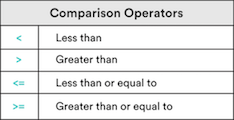
The first way is with comparison operators.
How does a computer decide True or False?
Quick Check:
- Now that we can have a computer say "yes" or "no," we can bring in comparisons and logic. Comparison operators take two variables and contrast them. Mostly, we will be comparing strings and numbers.
- Python also allows us to compare some more complex data types, which we will learn about soon.
- Can you think of any use cases for comparison? What programs might need this?
Comparison Types Practice#
Check out these comparison operators. Why do you think the last one is False?
Repl.it note: This repl.it contains the following code:
print("3 < 5 is...", (3 < 5))
print("13 >= 13 is....", (13 >= 13))
print("50 > 100 is...", (50 > 100))
print("'d' < 'a' is...", ("d" < "a"))Quick Check:
- Why is that last one false? Because
doccurs afterain the character set. - To a computer, characters go
a,b,c,d… Becausedis afterain a computer's order,a<d. Therefore, this string comparison will evaluate toFalse.
Equality Operators: Equality (==)#
- Accept any two types of data as inputs.
- Will only evaluate to
Trueif both sides are completely identical in data type and value.
Repl.it note: This repl.it contains the following code:
print("5 == 5 is..", 5 == 5)
print("6 == 3 is...", 6 == 3)
print("'5' == 5 is..", "5" == 5)Quick Checks:
Take note of the difference between strings versus numbers.
Make sure you understand types — strings versus numbers, for example.
"7"compared to7.Now, let's take a look at equality operators.
Equality operators check to see whether or not two values are the same as, or equal to, each other.
This operator will accept any two types of data as inputs and evaluate to a Boolean value (
TrueorFalse).It will only evaluate to
Trueif both sides are completely identical in data type and value (i.e., a string and a number will never be equal because they are different data types.)For example,
5 == 5will evaluate toTrue, while5 == "5"will evaluate toFalse, as, while the values are the same,5is a number and"5"is a string. (Strings always have quotes.)
Equality Operators: Inequality (!=)#
- Will accept any two types of data as inputs.
- The reverse of the equality operator.
Repl.it note: This repl.it contains the following code:
print("5 = 5 is..", (5 != 5))print("6 != 5 is..", (6 != 5))print("'5' != 5 is..", ("5" != 5))Quick checks:
- This operator will also accept any two types of data as inputs and evaluate to a Boolean value.
- It is essentially the reverse of the equality operator — it compares two values to check that either the data type or the value are not the same.
- For example,
5 !== 5will evaluate toFalse, while5 != "5"will evaluate toTrue.
Comparison Operators: Knowledge Check#
What do you think the following will equal?
8 > 88 >= 88 <= 157 != "7"6 == 76 != 7
"Truthy" and "Falsey"#
Something that's True is always true… right?
Yes, I totally cleaned my room. Just don't look under the bed…
Sometimes, we need "truthy" and "falsey." They're not explicitly True or False, but implicitly behave in the same way.
- Sometimes,
TrueandFalsereally mean, "Is there anything there?"
"Hello, World!" # A non-empty string: Truthy / True.13 # A non-zero number: Truthy / True."" # An empty string: Falsey / False.0 # The number 0: Falsey / False.Quick checks:
TrueandFalseare the standard Boolean values that we'll be using with our comparisons. However, in Python there are also other values that will evaluate toTrueorFalseif they are used in a comparison. These are called "truthy" and "falsey" values because they are not explicitlyTrueorFalsebut they implicitly behave in the same way.- Any string (or other collection, like a list, which we'll learn about soon) that is empty is considered "falsey," so it evaluates to
False. Similarly, any number with a value of zero is consideredFalse. In these situations,TrueandFalseresults basically indicate whether or not the variable you are comparing contains a value.
The Logical Operators: or and and#
What if we need to check multiple things that must all be True?
To make a peanut butter and jelly sandwich, we need peanut butter, and jelly, and bread.
Or check multiple things and only one needs to be True?
To make a fruit salad, we only need oranges, or apples, or strawberries.
Quick checks:
- Now we know how to compare two values and get a Boolean result. But, what if we need to compare multiple things that must all be
True? Or compare multiple things, any one of which must beTrue?
The Logical Operators: or#
or checks if either comparison is True.
Repl.it note: The repl.it contains:
red_score = 7blue_score = 5green_score = 0yellow_score = 0
# or prints the first truthy statement.print(red_score or blue_score)# 0 is considered Falseprint(green_score or blue_score)# If all are false, or prints the last False statement.print(green_score or yellow_score)Quick Checks:
orchecks if either comparison isTrueand returns the firstTruevalue it finds. If neither side isTrue, thenorreturnsFalseand the lastFalsevalue.
The Logical Operators: or Truth Table#
The or truth table:
True or True# => TrueTrue or False# => TrueFalse or True# => TrueFalse or False# => FalseHere is a list to help keep track. A list like this is called a truth table.
The Logical Operators: and#
and checks if both comparisons are True.
Repl.it note: The repl.it contains:
red_score = 7blue_score = 5green_score = 0yellow_score = 0
# and returns the last True statement.print(red_score and blue_score)# and returns the first False statement.print(green_score and blue_score)print(green_score and yellow_score)Quick check:
- "
andchecks if both comparisons areTrue. If both sides areTrue, thenandwill give back the lastTruevalue. If either side isFalse,andwill return the firstFalsevalue it finds."
The Logical Operators: and Truth Table#
The and truth table:
True and True# => TrueTrue and False# => FalseFalse and True# => FalseFalse and False# => FalseQuick Review: Comparing Variables Using Operators#
When comparing, a computer always returns a Boolean value:
TrueorFalse.We compare with operators like
<,<=,>,>=,==, and!=.We can also use the logical operators
andandor.
Pro tip: Using only one equal (=) always assigns the variable!
Up next: Conditionals.
Conditionals: if#
Do you remember this?
If the bread is thicker…
If the bread is brown…
How can we put that in a program?
if the bread is thick    # print("Dunk the bread longer!")
# No matter what:print("Finished dunking the bread")Quick checks:
- Take note of the indent (4 spaces), so we know which part of the pseudocode goes with the
if. Theprintstatement is not indented, so we know that it's not part of theifand always happens.
if Syntax#
if condition:    # Run these lines if condition is True.    # These lines are indented.
# Unindented things always happen.Repl.it note: The repl.it contains:
bread = "thick"if bread == "thick": print("Dunk the bread longer!")print("Done dunking the bread!")- Here's how you write an
ifstatement. We use the wordifand then put in the logical comparison we want to make. Theifline ends in a colon. The indented lines that follow are the lines that will only be run if the condition results inTrue. - This program sets up two variables and then compares them to certain values to decide if the next lines should be executed.
- We check to see if
breadis equal to"thick". If it is, we print this message. - Because the bread was thick, the condition evaluated to
Trueand the next line ran.
We Do: It's Too Hot In Here#
Remember, in a We Do, you follow along!
Our goal: A temperature program that lets us know when it is too hot.
On your computer, open VSCode and create a new file; save it as
control_flow.md.Set up a temperature variable.
Type this; don't just copy! The more practice you have typing it, the easier it will be to remember.
temperature = 55print("It's too hot!")- Let's write a program that sets the temperature to
55degrees Fahrenheit and then immediately prints that it is too hot.
We Do: Add an if Statement#
That's not hot! Let's add an if statement:
temperature = 55if temperature > 80: print("It's too hot!")What about a higher temperature? Like 95?
- Note the difference between space indents versus tab indents. Note that the Python style guide calls for four spaces.
- Typing different numbers of spaces don't work. You must be consistent
Quick check:
- OK, we have a program that sets the temperature to 55 degrees Fahrenheit and then immediately prints that it is too hot. But 55 degrees isn't really hot, so our app is kind of useless. Let's give it the ability to make a decision about whether or not it is too hot. Now our program will only complain about the heat if it is above 80 degrees.
- At present, the program prints nothing. Let's make sure our
ifstatement works.
We Do: The else Statement#
What about printing a message for when it isn't too hot?
if condition: # Do somethingelse: # Do something elseThe else block is executed only if the if condition evaluates to False.
Let's try it:
temperature = 95if temperature > 80: # If true, run this code block. print("It's too hot!")else: # Otherwise, run this code block. print("It's just right!")Quick Checks:
- Using the
ifstatement like the one above gives us a situation where the program will do something if the condition isTruebut it will do nothing if the condition isFalse. What if we want it to do one thing if it'sTrueand a completely different thing if it isFalse? Python gives us theelsestatement. It has this basic structure. This works exactly the same as a simpleifstatement except that it addselseand another line that will be executed only if the condition evaluates toFalse. - Let's use this to add some more messages to our temperature program so that it will say something for any temperature. Now for any temperature above
80, the program will print a complaint. Else, if the temperature is not above80, the program will express its satisfaction. Change the temperature to65and run it again. Python chooses the other path now and executes the line saying that it is just right.
Discussion: Other Cases#
What if it's too cold? We need more conditions.
if temperature > 80:    # If it is too hot, run this code block.    print("It's too hot!")
# We want: Else if temperature < 40.# We want: Print that it's too cold  .
else: # Otherwise, run this code block. print("It's just right!")What do you think we need?
Quick Checks:
- This is great! Now we can have our programs actually look at some data and make a different decision based on its value. It reads the
temperaturevariable and compares the value to80. Because the temperature we coded in was lower than80, it evaluated toFalseand printed the "It's just right!" comment. But as we all know, the world is not all black and white and frequently we will need to have more than two branches from which our program to choose.
We Do: The elif Statement#
That's where the elif ("else if") statement works its magic.
temperature = 60
if temperature > 80:    print("It's too hot!")
elif temperature < 40:    print("It's too cold!")
else: print("It's just right!")Quick Checks:
- That's where the
elifstatement works its magic.elifis a portmanteau of "else if." It is used when you need to have multiple branches of execution but each one needs to use a different comparison. Let's use this to beef up our temperature program to give some nice feedback. - Let's look at this line by line. We make our
temperaturevariable and set it to95. Then, we check to see if it is greater than80. If it is, we print the "hot" message. If that condition isFalse, we then move to the next one, which checks to see if the temperature is between60and80. Note the use of theandoperator to make sure that both of those comparisons must beTruefor the whole conditional to beTrue. If the temperature is less than or equal to80and greater than60, then we print the "just right" message. If that one isFalse, we proceed to the nextelif, which checks for cold temperatures. Finally, we end withelse. You will useelseas the last statement in any block that useselifstatements."
We Do: Adding More elif#
We can have as many elif as we'd like, but only one else.
Let's change this up — remember, type this out for practice.
temperature = 95if temperature > 80: print("It's too hot!")elif temperature <= 80 and temperature > 60: print("It's just right!")elif temperature <= 60 and temperature > 40: print("It's pretty cold!")else: print("It's freezing!")Thought Exercise#
What do you think the following code will print? Why?
foo = 5bar = 1if foo > 13: print("Flip")elif bar: print("Flop")else: print("Fly")- See if you can explain it, not you.
Partner Exercise: Even or Odd#
Pair with a new partner. Decide who will drive and who will navigate.
Open a new file in VSCode; save it as check_even.py.
In it, write a program that prints whether a number is even or odd.
Do you remember how to determine that?
- We can use the modulus operator (
%) to check the remainder.
Here is some code to get you started:
number = 10remainder = number % 2# For an even number, print "It's even!"# For an odd number, print "It's odd!"Partner Exercise: and and or#
Switch driver and navigator.
In a file (it can be the same one), write a program that compares two variables and prints out statements accordingly. Start here and follow this:
x = 8y = 0a = "Hello!"b = ""
# Check if x and b are both True. If they are, print "Both of these are true."# Check if y or a is False. If one is, print "One of these is false."# Check if either x or y is False. If one is, print out "One is false."# Then, only if either x or y is False, check if x is greater than y. If it is, print out "x is greater than y."5 MINUTES
Summary: Boolean Values and Operators#
We've started control flow — changing what our program does based on a decision. We used:
Boolean values#
TrueandFalse.- The corresponding "truthy" and "falsey".
Conditional operators**#
- Comparison:
<,>,<=, and>=. - Equality:
==and!=.
Logical operators: all and or
orevaluates toTrueif any of the comparisons areTrue.andevaluates toTrueonly if all of the comparisons areTrue.
1 MINUTE
Summary and Q&A#
Then, we went into if and else:
"If your toast is thick, dip the bread for longer, else do not."
if: Use only as the first conditional operator.elif: Adds multiple comparisons to yourifblocks.else: Use only at the end of your code block, for if the previous conditional tests areFalse.
Quick Checks:
- Just like using the words "if" and "else" in real life, these let us make decisions in our programs.
ifstatements let us control the flow of execution in our programs.- We use conditional operators in our
ifstatements to perform the comparisons. - The
elsestatement lets us define what to do when our primary conditional test isFalse. - The
elifstatement lets us add multiple comparisons to ourifblocks.